Introducing Nibit: The Shortcut Keyboard for Android
Why we built Nibit to make mobile writing faster, cleaner, and less frustrating for people doing real work from their phones.
The Friction Kept Showing Up
I've been doing a lot more real work from my phone lately. Some of that is lifestyle. Some of it is the natural result of AI-assisted workflows making it easier to keep momentum going away from a desk.
The problem is that Android typing still feels optimized for casual messages, not serious work.
The keyboard is cramped. Dictation gives you a transcript when what you wanted was a clean message. And the moment you need to write more than a quick reply, the whole experience starts pushing you back toward a laptop.
The Gap
I didn't want to build a replacement keyboard. I just wanted a fast way to access snippets, dictation cleanup, text transforms, and cross-device actions.
Gboard is already good at being the default keyboard. The goal was to add power features without giving up the keyboard and muscle memory you already rely on.
What We Built

Nibit is an Android keyboard designed to work alongside your existing one, not replace it.
Switch to Nibit when you need a shortcut or a superpower: expand a snippet, dictate text, run an AI transform, or push something to your laptop. When the action is done, it switches you back to your main keyboard automatically.
That "other keyboard" model ended up being the unlock. It keeps the workflow lightweight enough to use constantly.
How It Works
Nibit starts with the basics: simple triggers like ,addr can instantly expand into a full address, support response, or any other repeated text.
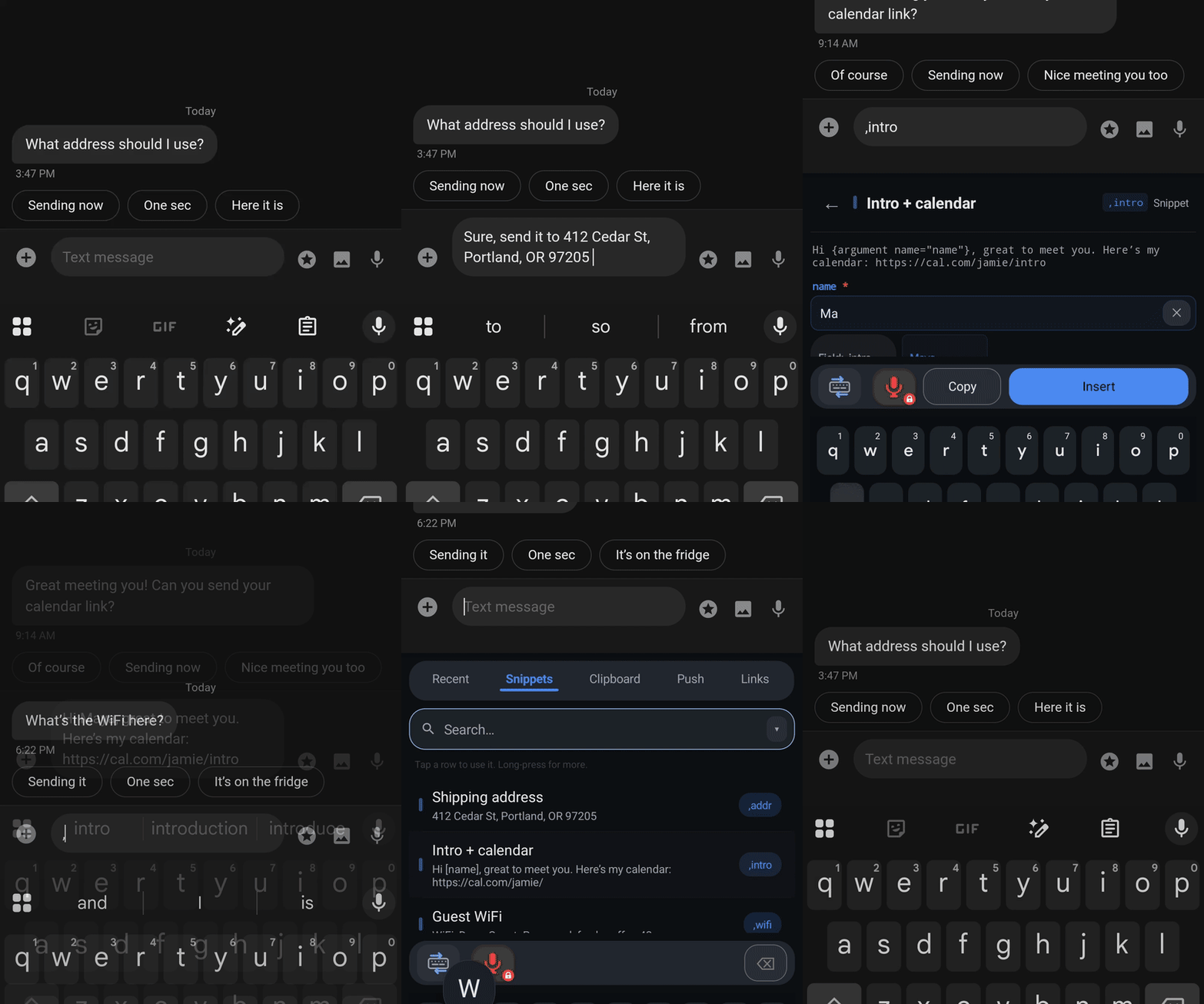
From there, it adds higher-leverage actions:
- Smart dictation that removes filler words, handles self-corrections, and turns rambling speech into clean text.
- AI transforms for rewriting, shortening, polishing, or reformatting selected text in place.
- Secure push for moving text, links, files, and screenshots between your phone and laptop without emailing or texting yourself.
- Quick links, clipboard tools, and imports that make the keyboard useful as part of a broader workflow, not just text entry.
For Raycast users, Nibit can also fit neatly into an existing setup, including importing snippets and quick links you already have.
Why This Matters
More work is moving onto smaller devices. The bottleneck isn't just screen size. It's interaction quality.
Nibit is our attempt to make the phone better at real output through better input. To help people write faster, move information more easily, and stay productive when they're away from a full keyboard.
That fits the Crouton Creations model pretty well: find the friction, build the tool we wish already existed, and see how far a small AI-assisted team can push it.
Get Started
You can explore the full feature set at nibit.app or download Nibit directly from Google Play.